

What Is Vibe Coding?
Vibe coding is a method of building software where you describe what you want in plain English, and Artificial Intelligence writes the code for you. You do not need to memorize programming languages, understand complex syntax, or spend years studying computer science. You just need a clear idea and the ability to communicate it.
The term was coined in February 2025 by Andrej Karpathy, a prominent AI researcher and former Director of AI at Tesla. He described it as a process where you "fully give in to the vibes, embrace exponentials, and forget that the code even exists." Collins Dictionary named it their Word of the Year for 2025.
"There's a new kind of coding I call 'vibe coding', where you fully give in to the vibes, embrace exponentials, and forget that the code even exists."
Andrej Karpathy, February 2025
The Chef Analogy That Makes It Click
Think of yourself as the head chef in a high-tech kitchen. You write the recipe (the prompt) and the AI acts as your sous-chef, chopping, stirring, and cooking at incredible speed. You do not need to know how to hold the knife perfectly. You just need to know what the final dish should taste like. The AI handles the technical execution; you handle the vision and direction.
How Is This Different From Traditional Coding?
| Aspect | Traditional Coding | Vibe Coding |
|---|---|---|
| Learning curve | Years of study required | Start building in hours |
| Input method | Precise programming syntax | Plain English descriptions |
| Speed to prototype | Days to weeks | Hours to days |
| Who can do it | Trained developers | Anyone with a clear idea |
| Control level | Complete, granular control | High-level direction |
| Best for | Complex, scalable systems | MVPs, tools, prototypes |
Mentor's Take
Vibe coding does not replace professional developers for complex, enterprise-grade systems. Think of it as a powerful new tool that dramatically lowers the barrier to entry and accelerates early-stage development. It is best understood as a superpower for idea validation and rapid prototyping.
What Can You Build with Vibe Coding?
The short answer is: almost anything at the prototype or MVP stage. Vibe coding has already produced thousands of real, functional applications used by real people. Here are categories of what is being built right now, with actual examples.
Personal Productivity Tools
Custom task managers, meal planners that scan your fridge, habit trackers, and focus timers tailored to your exact workflow.
Real Example
Mealmuse, built with Lovable and Cursor, generates personalized meal plans from fridge photos.
Websites & Web Apps
Portfolio sites, landing pages, SaaS dashboards, news aggregators, and community platforms.
Real Example
Refetch, an open-source Hacker News alternative, was built in just 15 hours using Cursor and Appwrite.
Business & Internal Tools
Admin dashboards, resume scoring agents, chore management apps, and customer support bots.
Real Example
ChoresAI uses AI photo verification to confirm completed chores and automate reward payments.
Creative & Niche Projects
Apps that turn emojis into bedtime stories, Spotify playlists into physical postcards, or old photos into moving videos.
Real Example
Mixcard: converts Spotify playlists into vintage-style printable postcards with QR codes.
Lead Generation Tools
Interactive calculators, ROI estimators, and assessment tools that convert website visitors into qualified leads.
Real Example
SEO Forecast Calculator: built with Cursor by Animalz as a top-of-funnel lead magnet.
AI Agents & Automations
Resume scoring agents, AI tutors, study plan generators, and tools that connect to thousands of other apps.
Real Example
Nora AI, an AI tutor built with Bolt, uses video conversations and creates personalized study plans.
Know the Limits
Vibe coding excels at getting a project 80% of the way there, fast. The remaining 20%, making it secure, scalable, and production-hardened for thousands of paying users, typically requires experienced engineering oversight. This is not a flaw; it is just the honest reality of where the technology stands today.
How to Get Started with Vibe Coding
Getting started with vibe coding does not require any prior technical knowledge. What it does require is a clear vision, a willingness to experiment, and the patience to iterate. Here is the exact workflow we recommend for beginners.
Define Your Vision Before You Open Any Tool
This is the step most beginners skip, and it is the most important one. Before you touch any AI tool, write down exactly what you want to build. Create a simple document with three things: (1) the core problem your app solves, (2) who it is for, and (3) the three to five features it absolutely must have on day one. The AI needs a clear destination. Without one, it will guess, and its guesses will cost you time.
Write your app idea as a single sentence: 'I want to build [what] for [who] that does [core function].' This becomes your north star prompt.
Choose the Right Tool for Your Skill Level
For your very first project, start with an AI App Builder like Lovable or Bolt.new. These tools generate entire applications from text descriptions with no setup required. You can see results in minutes. Once you are comfortable, you can graduate to AI Code Editors like Cursor, which give you more control but require basic familiarity with how code files are organized.
Do not try to learn multiple tools at once. Pick one, build one complete project, and then try others.
Master the Art of Prompting
Your success in vibe coding is directly proportional to how clearly you communicate with the AI. Vague prompts produce vague results. Specific prompts produce specific results. Always include: what you want built, what it should look like, what it should do, and what it should not do. Providing examples (links to websites you like, or descriptions of existing apps) dramatically improves output quality.
Build in Small, Testable Increments
Do not ask the AI to build an entire e-commerce store in one prompt. Ask it to build the product listing page first. Test it. Then ask for the shopping cart. Test it. Then the checkout flow. This incremental approach keeps the AI's context clean, makes debugging far easier, and gives you a working version at every stage.
After every new feature, test it immediately before asking for the next one. Catching bugs early is ten times easier than debugging a fully built app.
Review, Test, and Never Blindly Trust
AI-generated code can look perfect on the surface while hiding bugs or security issues underneath. Test every button. Fill out every form. Try to break your own app. If you are building something that will handle real user data, have a professional review the code before you go live. This is not optional. It is responsible development.
What a Good Prompt Looks Like
❌ Weak Prompt
✅ Strong Prompt
- A dashboard showing tasks organized by project
- The ability to set due dates and priority levels (High/Medium/Low)
- A simple timer to track time spent on each task
- A clean, minimal design with a white background and dark text
Do not include team collaboration features yet. Focus on single-user functionality."
The Best Vibe Coding Tools: An Honest Review
The AI coding tool market is crowded and evolving fast. We have tested and researched every major option so you do not have to wade through marketing copy. Here is our honest assessment of each tool, including what they are genuinely great at and where they fall short.
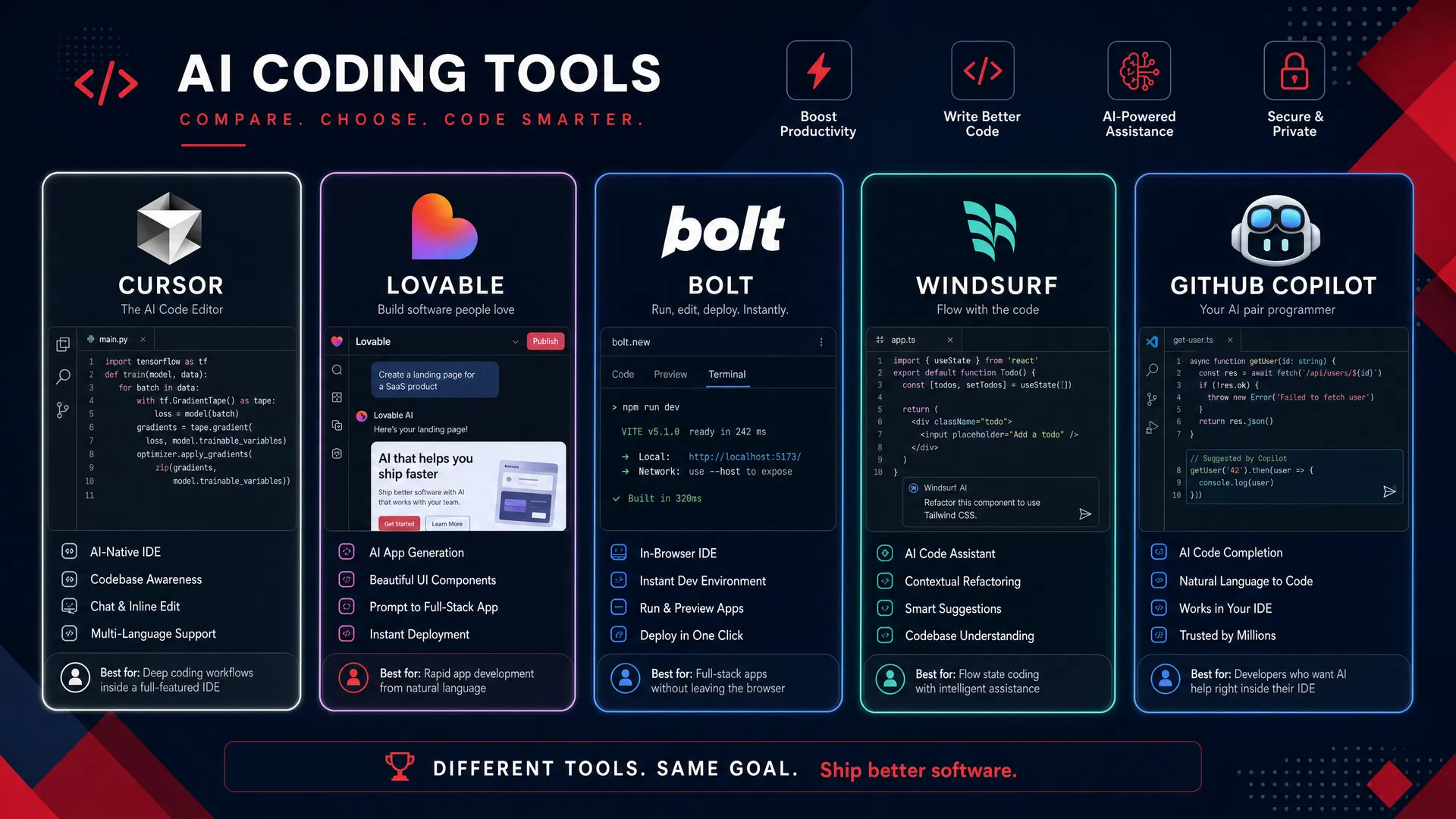
All pricing data sourced from official vendor pricing pages as of May 2026. Prices are subject to change.
Affiliate disclosure: Some tool links in this section may be affiliate links. If you click through and purchase a plan, Cardinal Stacks may earn a small commission at no extra cost to you. This helps keep the Playbook free. We only recommend tools we have genuinely tested and believe in. Our reviews are honest regardless of affiliate status. Want to support the guide without buying anything? Share it with someone who needs it.
Cursor
The AI Code Editor for Serious Builders
✓ What It Does Well
- Unmatched codebase awareness: it reads your entire project, not just one file
- Unlimited 'Auto' mode on all paid plans keeps costs predictable
- Multi-file editing and background cloud agents are genuinely powerful
- Crossed $1B in annualized revenue and has strong long-term staying power
✗ Where It Falls Short
- Requires some comfort with code file structure to get full value
- Credit-based pricing model can be confusing at first
- Can lag on very large, complex codebases
Our Verdict
Cursor is the gold standard for developers who want AI deeply integrated into a professional coding environment. If you have any technical background at all, this is the tool you will eventually graduate to. For complete beginners, start elsewhere and come back.
Lovable
The Fastest Path from Idea to Working App
✓ What It Does Well
- Generates beautiful, functional UIs from plain English descriptions
- Built-in deployment: your app is live with one click
- Excellent for landing pages, portfolios, and SaaS prototypes
- No setup, no terminal, no configuration required
✗ Where It Falls Short
- Struggles when your requirements move far from standard web app patterns
- Daily credit system can feel limiting on the free tier
- Less control over the underlying code compared to IDE-based tools
Our Verdict
Lovable is our top recommendation for complete beginners. It removes every technical barrier and lets you focus entirely on your idea. The output quality for standard web applications is genuinely impressive. Just know that complex, custom logic will require additional tools.
Bolt.new
Full-Stack App Building, Right in Your Browser
✓ What It Does Well
- Most generous free tier in the market: 1 million tokens per month
- Handles frontend, backend, and database setup in a single workflow
- Generates sensible, organized file structures from the start
- In-browser environment means zero local setup required
✗ Where It Falls Short
- Tends to rewrite entire files for minor changes, burning through tokens quickly
- Can produce inconsistent results on complex, multi-step features
- Less polished UI output compared to Lovable for purely visual work
Our Verdict
Bolt.new's free tier is the best starting point for anyone who wants to build a full-stack application without spending a cent. The token-based model is transparent, and the in-browser environment is genuinely convenient. A strong choice for your first project.
Windsurf
The Agentic IDE with a Polished Workflow
✓ What It Does Well
- Clean, modern interface that feels purpose-built for AI workflows
- Fast initial code generation with direct in-file edits
- Strong contextual understanding of existing codebases
- Good enterprise compliance features for regulated industries
✗ Where It Falls Short
- Switched to daily/weekly usage quotas in March 2026; heavy users hit limits mid-day
- The quota system is less predictable than Cursor's unlimited Auto mode
- Smaller community and fewer tutorials compared to Cursor
Our Verdict
Windsurf is a genuinely excellent IDE that competes closely with Cursor. The March 2026 pricing overhaul to a quota system was controversial and is the main reason it ranks slightly below Cursor for power users. For those in enterprise environments with compliance needs, it is worth a serious look.
GitHub Copilot
The Reliable Standard for VS Code Users
✓ What It Does Well
- Best value in the market at $10/month for Pro: 300 premium requests, unlimited completions
- Tight integration with VS Code and GitHub workflows
- Access to Claude Opus 4.6 on the Pro plan
- Trusted by millions of developers; extremely stable and well-documented
✗ Where It Falls Short
- Integrates into VS Code rather than providing its own IDE, so it is less tightly integrated than Cursor
- More conservative approach means slower raw code generation
- Less suited for the 'describe and build' workflow that pure vibe coders prefer
Our Verdict
GitHub Copilot Pro at $10/month is the best value in the entire AI coding market. If you already use VS Code and GitHub, it is an obvious choice. For pure vibe coding beginners starting from scratch, Lovable or Bolt.new are more appropriate entry points.
Manus
The Autonomous AI Agent That Builds While You Sleep
✓ What It Does Well
- Fully autonomous: give it a task and it researches, codes, and deploys without hand-holding
- Handles the entire stack: web apps, data analysis, presentations, and browser automation in one platform
- Projects and Skills system lets you build reusable workflows that run on a schedule
- 500 bonus credits with the referral link, enough to build and test a real project for free
✗ Where It Falls Short
- Credit system can be unpredictable: complex tasks consume credits faster than expected
- Output quality for complex multi-feature apps is less polished than Lovable or Cursor
- Advanced features (Skills, browser automation) have a learning curve for complete beginners
- No offline mode; everything runs in the cloud
Our Verdict
Manus is the most autonomous vibe coding tool available. You describe what you want, and it handles research, coding, and deployment without requiring you to stay involved. The free tier with 300 daily credits is genuinely useful, and the 500-credit referral bonus makes it a risk-free first project. For founders who want to build tools and automations without touching a terminal, it is a compelling choice.
Replit
The All-in-One Browser IDE with Instant Deployment
✓ What It Does Well
- Zero setup: you are coding in a browser within 60 seconds of creating an account
- Agent 3 is genuinely autonomous: it builds features, runs tests, and fixes errors without prompting
- Built-in PostgreSQL and SQLite databases with zero configuration required
- Real-time multiplayer coding (Google Docs-style) for teams and pair programming
- $20 in credits with the referral link, enough to build a full MVP
✗ Where It Falls Short
- Credit system is opaque: heavy AI usage can exhaust your monthly allocation faster than expected
- Slower initial build time compared to Bolt.new and Lovable for simple projects
- Multi-file navigation gets cluttered on larger projects with 8+ open files
- Teams plan at $35/user scales poorly for small agencies
Our Verdict
Replit is the best choice for beginners who want to learn how code actually works while building real apps. Agent 3's autonomous error handling is genuinely impressive, catching edge cases you would never think to specify. The $20 referral credit makes the Core plan effectively free for your first month. If you want a browser-based environment that handles hosting, databases, and AI in one place, Replit delivers.
Bolt44
AI-Powered Full-Stack Builder with Generous Token Bonuses
✓ What It Does Well
- 200,000 bonus tokens on signup, one of the most generous referral bonuses available
- Full-stack generation: frontend, backend, and database in a single workflow
- In-browser environment means zero local setup required
- Transparent token model so you always know what a build costs
✗ Where It Falls Short
- Affiliate link coming soon. Check back for the direct referral link
- Detailed review in progress as the platform continues to evolve
Our Verdict
Bolt44's 200,000-token signup bonus is one of the most generous offers in the vibe coding space, giving you substantial room to build and experiment before spending a cent. Full review coming soon. In the meantime, the referral link will be live shortly. Check back to claim your bonus tokens.
Hostinger
Beginner-Friendly Web Hosting with One-Click AI Site Builder
✓ What It Does Well
- One-click WordPress, WooCommerce, and 150+ app installs from the hPanel dashboard
- AI Website Builder generates a complete site, including copy and images, in under two minutes
- 12-month plans include a free domain and a 30-day money-back guarantee
- Managed WordPress hosting with Elementor and Block Editor built in
- LiteSpeed servers with built-in caching deliver fast load times on shared plans
- 20% discount applied automatically through the referral link
✗ Where It Falls Short
- Renewal pricing is significantly higher than the introductory rate. Read the renewal terms before purchasing
- Phone support is not available; support is chat and ticket only
- Storage limits on the base plan (100 GB SSD) can feel tight for media-heavy sites
- Advanced server configuration requires upgrading to a VPS plan
Our Verdict
Hostinger is the most beginner-accessible hosting option in this guide. The hPanel dashboard is clean and intuitive, the one-click installers genuinely work, and the AI Website Builder is fast enough to get a real site live in a single afternoon. The 12-month plan is the sweet spot: you get a free domain, the 30-day money-back guarantee, and the lowest per-month rate. The 20% referral discount makes it even easier to get started.
Interactive Tool
Which Vibe Coding Tool Is Right for You?
Answer 3 quick questions and we will recommend the best tool for your situation.
Question 1 of 3
What is your coding experience level?
Going Deeper: Claude Code & OpenAI Codex CLI
Browser-based vibe coding tools are perfect for getting started. But once you are ready to work with real codebases, run terminal commands, and have AI that truly understands your entire project, it is time to meet the two most powerful AI coding agents available today: Claude Code from Anthropic and Codex CLI from OpenAI. Both run directly in your terminal and connect to your local files.
What You Will Need First
Before installing either tool, you need three things on your computer: Visual Studio Code (your code editor), GitHub Desktop (for version control), and a terminal. iTerm2 on Mac is excellent. We also strongly recommend Wispr Flow for voice dictation, which lets you speak your coding instructions instead of typing them. Links and setup instructions for all four are included below.
Step 0: Install Your Foundation Tools
Visual Studio Code
The most popular free code editor in the world. Both Claude Code and Codex CLI integrate directly into VS Code, giving you AI assistance inside your editor.
macOS · Windows · Linux
Download VS Code (free)GitHub Desktop
A visual interface for Git version control. It lets you save checkpoints and roll back to any previous version of your code without using the command line.
macOS · Windows
Download GitHub Desktop (free)iTerm2 (Mac) / Windows Terminal
A powerful terminal replacement. iTerm2 on Mac gives you split panes, search, and better color support. Windows users should use the built-in Windows Terminal app from the Microsoft Store.
macOS only. Windows users: use Windows Terminal
Download iTerm2 (Mac, free)Wispr Flow (Pro Tip)
Dictate your coding instructions instead of typing them. Wispr Flow works system-wide, so you can speak directly into Claude Code or Codex CLI prompts. Dramatically speeds up complex instruction writing.
macOS · Windows, paid app
Try Wispr FlowSupabase
An open-source Firebase alternative built on PostgreSQL. Gives your vibe-coded app a real database, user authentication, file storage, and auto-generated APIs, all from a visual dashboard. Free tier supports two active projects with 500 MB of database storage and 1 GB of file storage.
Free tier available · Pro plan $25/mo per project
Get started with Supabase (free)Claude Code
by Anthropic, Terminal CLI + VS Code Extension
Claude Code is an agentic coding assistant that runs in your terminal and reads your entire codebase. Unlike browser-based tools, it can edit multiple files simultaneously, run commands, manage Git, and work across your whole project. It requires a Claude Pro, Max, Team, or Enterprise subscription ($20/month and up).
Step-by-Step Installation (macOS / Linux)
Open your terminal (iTerm2 or Terminal.app)
Run the native installer
Verify the installation
Navigate to your project folder
Start Claude Code (you will be prompted to log in on first run)
Windows Installation
In PowerShell:
Or install via Homebrew (Mac):
Install the VS Code Extension
Open VS Code, press Cmd+Shift+X (Mac) or Ctrl+Shift+X (Windows), search for "Claude Code", and click Install. Then open the Command Palette and type "Claude Code: Open in New Tab".
Pro Tip: Use Wispr Flow with Claude Code
Once Wispr Flow is running, press its activation shortcut and dictate your instructions directly into the Claude Code prompt. Say something like: "Add a user authentication system using email and password, store sessions in local storage, and show an error message if login fails." Claude Code will handle the rest.
OpenAI Codex CLI
by OpenAI — Open-source terminal coding agent
Codex CLI is OpenAI's open-source local coding agent. It runs in your terminal, reads your codebase, and can write, edit, and run code on your behalf. It works with your ChatGPT Plus, Pro, Business, or Enterprise plan, or with an OpenAI API key. The project has over 84,000 GitHub stars as of May 2026.
Step-by-Step Installation
Make sure Node.js is installed on your computer
If you see a version number, you are good. If not, download Node.js from nodejs.org
Install Codex CLI globally via npm
Or install via Homebrew (Mac)
Run Codex and sign in with your ChatGPT account
Navigate to your project and start a session
Using Codex in VS Code
Open the Extensions panel in VS Code (Cmd+Shift+X), search for "Codex", and install the official OpenAI extension. You can also run codex app in your terminal to open the full Codex desktop app.
Terminal Command Cheat Sheets
Bookmark these. You will use them constantly. These are the commands that matter most when working with Claude Code and Codex CLI from your terminal.
| Command | What It Does |
|---|---|
| claude | Start an interactive Claude Code session in the current directory |
| claude "fix the login bug" | Run a one-time task and exit |
| claude -p "explain this function" | Ask a quick question without starting a full session |
| claude -c | Continue the most recent conversation |
| claude --version | Check your installed version |
| claude doctor | Run a health check on your installation |
| /help | Show all available slash commands (inside a session) |
| /clear | Clear conversation history and start fresh |
| /login | Switch accounts or re-authenticate |
| exit or Ctrl+D | Exit the current Claude Code session |
| claude "write tests for the auth module" | Ask Claude to write tests for a specific module |
| claude "commit my changes with a descriptive message" | Let Claude handle your Git commit |
| tail -100 app.log | claude -p "any errors?" | Pipe log output directly to Claude for analysis |
| Command | What It Does |
|---|---|
| codex | Start an interactive Codex session in the current directory |
| codex app | Open the Codex desktop app interface |
| npm install -g @openai/codex | Install or update Codex CLI globally |
| npm update -g @openai/codex | Update to the latest version |
| codex --version | Check your installed Codex version |
| codex --help | Show all available flags and options |
| cd my-project && codex | Navigate to a project and start a session |
| node --version | Verify Node.js is installed (required for Codex) |
| brew install --cask codex | Install Codex via Homebrew on Mac |
| winget install OpenAI.Codex | Install Codex on Windows via WinGet |
| Command | What It Does |
|---|---|
| pwd | Print working directory: shows you where you are |
| ls | List files and folders in the current directory |
| ls -la | List all files including hidden ones, with details |
| cd folder-name | Navigate into a folder |
| cd .. | Go up one level in the folder structure |
| cd ~ | Go to your home directory |
| mkdir my-project | Create a new folder called my-project |
| touch filename.txt | Create a new empty file |
| cat filename.txt | Print the contents of a file to the terminal |
| clear | Clear the terminal screen |
| Ctrl + C | Stop whatever is currently running |
| git init | Initialize a new Git repository in the current folder |
| git status | See which files have been changed |
| git add . | Stage all changed files for commit |
| git commit -m "message" | Save a checkpoint with a description |
| git log --oneline | See a compact history of all commits |
| git checkout main | Switch to the main branch |
| npm install | Install all project dependencies listed in package.json |
| npm run dev | Start the development server for most projects |
| npm run build | Build the project for production |
New to the Terminal? Start Here.
The terminal can feel intimidating at first, but you only need about 10 commands to do 90% of your vibe coding work. Start with cd, ls, and claude. Everything else you can look up as you go. The cheat sheet above has everything you need.
Context Files & Prompt Engineering
Every AI coding session starts from zero. The model has no memory of what you built yesterday, no idea what tech stack you use, and no clue about your naming conventions. Context engineering is the practice of deliberately feeding the right information to the AI before it starts working, so it produces useful output the first time instead of the third.
Think of it like briefing a contractor before they start a job. A contractor who shows up with no briefing makes assumptions. Some will be right. Many will not. A contractor who arrives with a clear project brief, a list of house rules, and examples of the work style you want produces far better results on day one. Context files are that brief.
What Good Context Looks Like
A good context file is short, specific, and universally applicable to everything you ask the AI to do. It answers three questions: What is this project? How should you work on it? What are the rules?
# My Project

A React 19 + Supabase SaaS app for freelance invoice management.
Users create, send, and track invoices. Payments via Stripe.

## Stack
- Frontend: React 19, TypeScript, Tailwind CSS 4
- Backend: Supabase (Postgres + Auth + Storage)
- Payments: Stripe

## Commands
- `pnpm dev`   — start dev server on port 5173
- `pnpm test`  — run Vitest unit tests
- `pnpm build` — production build

## Rules
- TypeScript strict mode, no `any` types
- Named exports only, no default exports
- Never commit .env files
- The /api/webhooks/stripe route validates signatures — do not modify the signature check
What Bad Context Looks Like
Bad context files are either too long, too vague, or full of instructions that only apply to specific situations. Research from HumanLayer shows that frontier models can reliably follow roughly 150–200 instructions before quality degrades across the board. Claude Code's own system prompt already consumes around 50 of those slots. Every irrelevant line costs you.
Write clean, readable code.
Follow best practices.
Be careful with security.
Tells the AI nothing it does not already know. Wastes tokens, adds no value.
When creating a migration, first
check /db/migrations, then name
the file with a timestamp, then
run --dry-run first, then confirm
with the team lead, then...
A workflow for one task. Move it to a separate file and reference it.
Why Context Engineering Matters
Without a context file, you repeat yourself in every session. You correct the same mistakes. You get inconsistent output because the AI makes different assumptions each time. A well-crafted context file is a one-time investment that pays off on every single session after.
The @import system in Claude Code lets your main CLAUDE.md reference other files using @docs/api-patterns.md syntax. This keeps the root file short while making detailed guidance available on demand. Claude pulls in the referenced content when it is relevant to the current task.
Pro Tips
Pro Tip: Update your context file as you work
When the AI makes a wrong assumption, do not just correct it once. Tell Claude: 'Add this to my CLAUDE.md: always use the logger module instead of console.log.' The correction persists across all future sessions.
Pro Tip: Use emphasis sparingly for critical rules
Writing NEVER modify the /migrations folder directly in all caps increases the odds the AI pays attention. But if everything is in caps, nothing stands out. Reserve emphasis for the two or three rules that would cause real damage if broken.
Pro Tip: Separate personal preferences from team rules
Use CLAUDE.local.md (add it to .gitignore) for your personal quirks like preferred verbosity level or editor settings. Use CLAUDE.md for rules the whole team should follow, and commit it to version control.
Pro Tip: Keep your main file under 100 lines
Move task-specific instructions to separate files in an agent_docs/ or .claude/rules/ folder. Reference them in your main file. This way the AI only loads detailed instructions when they are relevant to what it is working on.
Configuration Files & Folders: The Complete Breakdown
Once you move beyond browser-based tools into terminal agents like Claude Code and Codex CLI, you gain access to a powerful configuration system. These files and folders control how the AI behaves, what it remembers, what it is allowed to do, and how it handles specific tasks. Here is every file that matters, what it does, and how to use it.
your-project/
├── CLAUDE.md                 ← Root context file (commit to git)
├── CLAUDE.local.md           ← Personal preferences (add to .gitignore)
├── AGENTS.md                 ← Cross-tool open standard (Codex, Cursor, etc.)
│
├── .claude/                  ← Claude Code configuration folder
│   ├── settings.json         ← Project-level Claude settings
│   ├── settings.local.json   ← Personal overrides (add to .gitignore)
│   ├── rules/                ← Modular rule files (all auto-loaded)
│   │   ├── code-style.md
│   │   ├── testing.md
│   │   └── security.md
│   ├── commands/             ← Custom slash commands (/review, /test-this)
│   │   ├── review.md
│   │   └── pr-prep.md
│   └── skills/               ← Reusable multi-step agent capabilities
│       ├── refactor/
│       │   └── SKILL.md
│       └── test-writer/
│           └── SKILL.md
│
└── .codex/                   ← Codex CLI configuration folder
    ├── config.toml           ← Project-level Codex settings
└── AGENTS.md ← Alternative instructions locationCLAUDE.mdThe most important file in your Claude Code setup. Claude reads it automatically at the start of every session. It is your project's persistent memory. It is the one file that makes the AI behave consistently across all conversations.
Where it lives
Project root (most common), .claude/CLAUDE.md, or ~/.claude/CLAUDE.md for global defaults
What goes in it
Project overview, tech stack, build commands, coding rules, architectural gotchas, and @imports to detailed docs
Best practice
Keep it under 100 lines. Commit it to version control. Use CLAUDE.local.md for personal preferences.
AGENTS.mdThe open-standard equivalent of CLAUDE.md. Supported by Codex CLI, Cursor, Windsurf, Zed, GitHub Copilot, Aider, and over 60,000 open-source projects. If you want one context file that works across multiple AI tools, AGENTS.md is the right choice.
Codex builds an instruction chain starting from your global ~/.codex/AGENTS.md, then walks down from the project root to your current directory, loading one file per directory level. Files closer to your current directory override earlier guidance.
# Instruction precedence (highest to lowest):
1. ~/.codex/AGENTS.override.md ← global override
2. ~/.codex/AGENTS.md ← global defaults
3. /project/AGENTS.override.md ← project override
4. /project/AGENTS.md ← project defaults
5. /project/subdir/AGENTS.md ← subdirectory rules
.claude/skills/ & SKILL.mdSkills are reusable, named agent capabilities, more powerful than slash commands because they can include multi-step workflows, tool use, and sub-agent coordination. Each skill lives in its own folder inside .claude/skills/ with a SKILL.md file that defines the workflow.
# Test Writer Skill

When invoked, generate a comprehensive test suite
for the specified file or function.

## Steps
1. Read the target file and understand its purpose
2. Identify all public functions and expected behaviors
3. Write unit tests: happy path, edge cases, errors
4. Match the project's existing test patterns
5. Run `pnpm test` and fix failures before finishing

## Output
- Test file saved with .test.ts suffix
- Summary of what was tested and what was skipped
.claude/commands/ (Slash Commands)Custom slash commands let you create reusable prompts that you invoke with /command-name inside Claude Code. Each command is a Markdown file in .claude/commands/. When you type /review, Claude runs the full prompt against your current codebase state.
Review the changes in the current git diff. Check for:
1. Security vulnerabilities (SQL injection, XSS, secrets)
2. Missing error handling
3. TypeScript type safety issues
4. Performance problems (N+1 queries, re-renders)
5. Missing or outdated tests

Format as a numbered list ordered by severity.
For each issue: file name, line number, specific fix.
prompts.md (Prompt Library)A prompts.md file is a library of proven prompts that consistently produce good results for common tasks. No AI tool loads this automatically. It is a reference document for you and your team. Keep it in your project root or in a docs/ folder.
## Debugging
"I am getting this error: [paste error].
Here is the relevant code: [paste code].
Walk me through what is causing this and provide a fix.
Explain why the fix works."

## Feature Planning
"I want to add [feature] to my [tech stack] app.
Before writing any code, give me a step-by-step plan
with the files I need to create or modify, in order."
.claude/settings.jsonControls Claude Code's behavior for your project: what commands it can run, what files it can write, which model to use, and what hooks to trigger automatically. The settings.local.json version holds personal overrides. Add it to .gitignore.
{
  "permissions": {
    "allow": [
      "Bash(pnpm *)",
      "Bash(git status)",
      "Bash(git diff *)",
      "Read(**)",
      "Write(src/**)"
    ],
    "deny": [
      "Bash(rm -rf *)",
      "Write(.env*)"
    ]
  },
  "model": "claude-opus-4-5",
  "hooks": {
    "PostToolUse": [{
      "matcher": "Write",
      "hooks": [{ "type": "command", "command": "pnpm lint --fix" }]
    }]
  }
}
Pro Tip: The hooks section is one of the most powerful features in Claude Code. Setting up a PostToolUse hook that runs your linter after every file write means you never have to manually fix formatting issues. The AI generates code and the linter cleans it up automatically.
.codex/config.tomlThe Codex CLI equivalent of settings.json. Uses TOML format. Your user-level config lives at ~/.codex/config.toml. Project-level overrides go in .codex/config.toml at your repo root. Project config only loads when you trust the project.
# Default model
model = "gpt-5.5"

# When Codex asks for approval before running commands
# Options: "on-request" | "never" | "untrusted"
approval_policy = "on-request"

# Filesystem access level
# Options: "workspace-write" | "read-only" | "danger-full-access"
sandbox_mode = "workspace-write"

# Web search behavior
web_search = "cached"

# Reasoning effort
model_reasoning_effort = "high"

# Communication style
personality = "friendly"

[features]
memories = true
multi_agent = true
The rules/ Folder: Modular Instructions
Instead of one large CLAUDE.md, you can split instructions into focused files inside .claude/rules/. Every .md file in this folder is automatically loaded with the same priority as your main CLAUDE.md. No imports needed. Just drop files in and they are included.
.claude/rules/
├── code-style.md ← formatting, naming, TypeScript rules
├── testing.md ← test structure, coverage, mocking patterns
├── security.md ← what never to commit, validation, auth rules
└── git-workflow.md ← branch naming, commit format, PR checklist
Pro Tip: The rules/ folder works well when different team members own different rule sets. The frontend team maintains code-style.md. The security team maintains security.md. Nobody has to merge conflicts in one giant file.
Tips & Tricks for Consistent Results
Vibe coding can feel like magic one day and a frustrating mess the next. The difference is almost always in the workflow, not the tool. These are the habits and techniques that separate builders who ship from those who get stuck.
Manage Your Context Window
AI tools have a 'memory limit' called a context window. If you work on the same project for hours without resetting, the AI gets confused by old, conflicting instructions. Start a new chat for every new feature. Think of it as giving the AI a fresh briefing for each task.
Always Ask for a Plan First
Before letting the AI write hundreds of lines of code, ask it to outline its approach. Say: 'Describe the files you will create and the logic you will use. Do not write any code yet.' Review the plan, correct any wrong assumptions, then give the green light. This single habit eliminates the majority of wasted effort.
Use Version Control from Day One
Even if you do not understand Git, use the built-in version history in your chosen tool. Before every significant change, save a checkpoint. When the AI breaks something (and it will), you can restore the last working version in seconds rather than spending hours trying to undo the damage.
Provide Examples, Not Just Descriptions
AI learns best from examples. Instead of saying 'make it look modern,' say 'the design should look similar to Linear.app: dark background, clean typography, minimal icons.' Paste in code snippets, share links, or describe specific UI patterns you have seen elsewhere.
One Feature at a Time
The most common mistake is asking for too much at once. Break every feature into the smallest possible unit of work. 'Add a user login form' is a task. 'Build a complete authentication system with social login, email verification, and password reset' is a project. Break it into five separate prompts.
Read the Code, Even If You Do Not Understand It
You do not need to understand every line, but you should skim what the AI produces. Look for obvious red flags: hardcoded passwords, 'TODO' comments, placeholder data, or functions that seem to do nothing. Ask the AI to explain any section that looks suspicious.
Test on Mobile Before You Ship
Most AI tools generate code optimized for desktop browsers. Always test your app on a mobile device before sharing it with anyone. Responsive design issues are extremely common in AI-generated code and are easy to fix early but painful to fix after launch.
Be Direct When Giving Feedback
When the AI produces something wrong, be specific about what is wrong and why. Do not say 'this looks bad.' Say 'the button is overlapping the text on mobile screens smaller than 375px wide. Move the button below the text and add 16px of top margin.' Precision in feedback produces precision in fixes.
Common Mistakes Beginners Make
We have seen hundreds of vibe coding projects, both the ones that succeed and the ones that fall apart. The failures almost always trace back to the same handful of mistakes. Here is what to watch out for, and exactly how to avoid each one.
The 'One Giant Prompt' Trap
Ignoring Security Entirely
The Infinite Patching Loop
Shipping Code You Cannot Maintain
Skipping the Planning Phase
Not Testing on Real Devices
What to Do When Your Vibe Code Breaks
Every vibe coder hits a wall. The app was working yesterday, and now it is not. Or the AI keeps generating the same broken code no matter how you rephrase the prompt. This is normal. Here is a systematic approach to getting unstuck.
The Vibe Code Rescue Checklist
Stop Adding New Features Immediately
The moment something breaks, freeze all new development. Adding new features on top of broken code creates a compounding mess that becomes exponentially harder to untangle.
Identify the Last Working State
Go to your version history and find the last version where everything worked correctly. This is your recovery point. If you do not have version history enabled, this is your reminder to enable it right now.
Describe the Error Precisely
Copy the exact error message from the browser console or terminal. Do not paraphrase it. Paste the exact error text into the AI and ask: 'What does this error mean, and what is the most common cause?' Understanding the error before asking for a fix dramatically improves the quality of the solution.
Ask the AI to Explain Before It Fixes
Before asking the AI to fix the bug, ask it to explain what is causing it. If its explanation does not match the symptoms you are seeing, it is working from a wrong assumption. Correct the assumption first.
Try a Completely Different Approach
If you have asked the AI to fix the same bug three times and it keeps producing broken code, the approach itself needs to change. Ask the AI: 'What is a simpler way to achieve [the goal] that avoids this issue entirely?'
Know When to Call for Professional Help
Some problems are beyond what vibe coding can solve on its own. If your app has a fundamental architectural flaw, a serious security vulnerability, or needs to scale to thousands of users, it is time to bring in an AI-fluent development firm.
Recognizing the "Vibe Coding Hangover"
The vibe coding hangover is a real phenomenon. Your app works, but it is slow, every new feature breaks three existing ones, and the AI is generating increasingly bizarre solutions to increasingly bizarre problems. This is called technical debt, and AI is exceptionally good at accumulating it quickly.
Signs you have a technical debt problem include: the AI refuses to make changes without rewriting large sections of unrelated code; your app takes more than 5 seconds to load; users report intermittent bugs you cannot reproduce; or you have more than 20 files in your project and cannot explain what half of them do.
When to Seek Professional Help
If you recognize three or more of these signs, the most cost-effective path forward is a professional code audit and rescue, not more prompting. Continuing to patch a fundamentally broken architecture will cost you more time and money than a clean rescue operation.
How to Find a Reputable Firm to Rescue Your Vibe Code
The vibe coding rescue market is growing fast, and unfortunately, so is the number of firms claiming to specialize in it without the expertise to back it up. Here is exactly what to look for, and what to avoid, when hiring a team to fix, rescue, or scale your AI-generated project.
What to Look For in a Vibe Code Rescue Firm
AI-Fluent Engineers, Not Just Traditional Developers
You do not want a firm that hates AI and wants to rewrite everything from scratch. You want engineers who actively use tools like Cursor, Claude Code, and Windsurf in their own workflows. They understand how AI thinks, why it made the architectural decisions it did, and how to work with the existing code rather than against it.
A Code Audit Before Any Proposal
A reputable firm will not quote you a price before understanding what they are dealing with. They should offer a comprehensive code audit that identifies security vulnerabilities, architectural flaws, performance bottlenecks, and technical debt. If a firm gives you a fixed price without reviewing your code first, walk away.
Stabilization-First, Not Rebuild-First
Be very wary of firms that immediately tell you, 'We have to scrap this and start over.' A good rescue service will stabilize your existing MVP, secure the data layer, and refactor the messy parts without throwing away the value you have already created. A full rebuild should be the last resort, not the first recommendation.
Verifiable Case Studies in AI Code Rescue
Ask specifically for case studies where they took an AI-generated MVP and successfully stabilized or scaled it for production. General web development experience is not the same as AI code rescue experience. The challenges are different, and the expertise required is different.
Transparent Communication and Knowledge Transfer
After the rescue, you should understand your own codebase better than you did before. A good firm documents their work, explains their decisions, and leaves you with a codebase you can maintain and grow. If a firm is secretive about their process, that is a red flag.
Red Flags to Watch Out For
- They give you a fixed price without reviewing your code first
- They immediately recommend a full rebuild without attempting stabilization
- They cannot explain what tools they use for AI-generated code review
- They have no case studies or references specific to AI code rescue
- They are vague about timelines, deliverables, or what 'done' looks like
- They do not offer any kind of post-rescue support or documentation
Cardinal Stacks: Where Vibe Code Meets Engineering Excellence
We are an AI development firm that specializes in everything from vibe coding and rescue operations to full-scale application development. We understand the vibe coding mindset because we live it, and we know exactly where AI-generated code needs a human expert's touch.
Code Audit
Comprehensive review of your AI-generated codebase: security, architecture, and performance.
Rescue & Stabilize
We fix what is broken, secure what is vulnerable, and refactor what is messy.
Scale to Production
Take your MVP from prototype to a product that can handle real users and real traffic.
Get a Free Code Audit
Tell us about your project and we will reach out within one business day. No obligation, no sales pitch, just honest feedback.
Frequently Asked Questions
The questions we hear most often from beginners, answered honestly.